
What is BPSC Exam Prep?
BPSC Exam Prep is an e-learning platform that offers affordable, high-quality, and comprehensive self-study resources, specifically designed for students preparing for the BPSC Integrated Combined Competitive Examination.
Who can Register/Sign-up?
Registration is open to all individuals seeking to enhance their examination preparation. However, it may be temporarily restricted between 12:00 AM to 6:00 AM (IST) for security purposes.
How can I Register and Login?
To register and log in, click the “Start Now” button if you are on the homepage, or click the “Login/Register” icon located at the top right of the navigation menu.
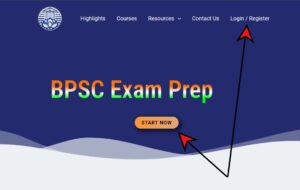
New users can create their account by registering their Username and E-mail id on the registration page.


Upon successful registration, a verification link will be sent to your email address. Please click the link to set a new password, after which you may log in using your updated credentials.
Can I keep my Username and E-mail same?
Yes, you can keep your Username same as your e-mail id.
What are the benefits of creating an account?
Only registered users are permitted to purchase courses and access the subscription-based articles by paying a nominal fee. Additionally, you will have a dedicated portal that tracks your learning progress, course materials, and downloads, ensuring easy access to your resources.
How can I access subscription-based articles?
To gain access to subscription-based articles you need to activate subscription plan by paying the required amount.
Details on Subscription page.
How can I delete my account?
To delete your account, please send a request to our support team at support@bpscexamprep.com. However, in certain instances, we may be required to retain your information for a duration necessary to comply with legal obligations or business compliance requirements.
Why Am I Unable to Create or Access My Account?
There may be several possible reasons:
1) Use of Restricted or Inappropriate Usernames or Email Addresses:
Solution: The ban may be either temporary or permanent.
Temporary Ban: You should be able to create or access your account within a day.
Permanent Ban: If the ban is permanent, access to the platform will no longer be available.
2) Multiple Failed Login Attempts:
Solution: It’s a temporary ban, you should be able to access your account after a short period.
3) Simultaneous Access from Multiple Devices:
Solution: Our platform allows only a single device access per user at a time.
For other reasons please contact the support e-mail.
What are the system requirements to use the platform?
Our platform is compatible with most modern devices, including desktops, laptops, tablets, and smartphones. For optimal performance, we recommend using the latest version of your web browser with JavaScript enabled.
The website is not loading correctly or showing gibberish content?
This issue may occur due to outdated cached files or temporary glitches in your browser.
Solution:
Follow these steps to resolve the issue:
- Perform a hard refresh by pressing Ctrl + Shift + R (or Cmd + Shift + R on Mac).
- Clear your browser cache:
- Open your browser settings.
- Find the Clear Browsing Data or Clear Cache option.
- Select “Cached images and files” and click Clear Data.
- Reload the website after clearing the cache.
If the problem still persist then try the following:
- Open the website in incognito mode or private browsing mode.
- Test the site on a different browser or device.
- Check your internet connection.
If none of these options work, then contact the customer support for further assistance.
How do I contact customer support?
You can reach our customer support via email at support@bpscexamprep.com or through the chat feature via WhatsApp on our website.